 ClickTrek
How to make a step-by-step guide with screenshots
Short answer: record the task once with a tool that takes a screenshot at every click and numbers the steps, then check the result and share the images. With the free ClickTrek extension for Chrome this takes a few minutes, needs no account, and the images stay on your device.
With ClickTrek (about 2 minutes)
- Install ClickTrek from the Chrome Web Store and pin it to the toolbar.
- Open the website where the task starts.
- Click the ClickTrek icon, then Start Recording.
- Do the task as you normally would. Each click gets a numbered badge and a highlight box, and the side panel lists the steps. If a link opens the next page, recording continues there.
- Click Finish. The Review capture page opens.
- Check each page. Add short step labels if you want text with the pictures, hide boxes you don't need, and delete any page that shouldn't be shared.
- Download the PNG (one page) or the .zip of numbered PNGs (several pages) and paste them into your document, ticket or message.
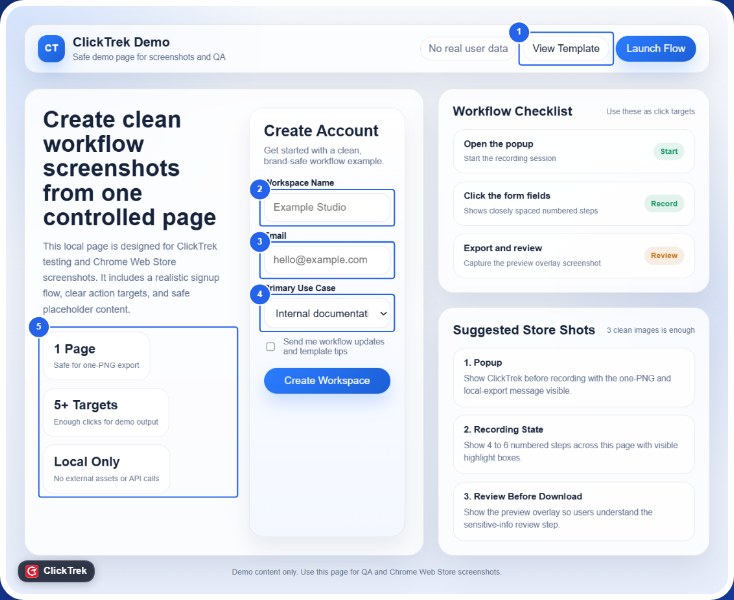
An exported page: each click has a numbered badge and a box around the element that was clicked.
By hand (fine for three or four steps)
- Write the steps as a numbered list first, one action per step.
- Take a screenshot at each step: Win+Shift+S on Windows, Cmd+Shift+4 on a Mac.
- Paste each screenshot under its step in Google Docs, Word or your wiki, and draw a box or arrow on the thing to click.
This works for short guides. Beyond a handful of steps it gets slow: every screenshot needs cropping and marking, inserting a step means renumbering, and a changed screen means redoing the pictures. That is the work a click recorder does for you.
Tips for a guide people can follow
- One action per step. One click, one picture, one sentence.
- Start from a page everyone can reach, such as the home page or a bookmarked link.
- Use test data. Record with a demo account or sample values so no real names, emails or numbers appear.
- Say what the reader should see after an important step ("The Invoices page opens").
- Test it. Give the guide to someone who has never done the task and fix wherever they get stuck.
Making a picture guide for a parent or friend
For someone less confident with computers, pictures with big numbers work better than written instructions. Record the task once on your own computer, keep each step to a single click, and send the images in order, or print them. A numbered badge on each click makes "click the thing with the 3 on it" easy to follow.
Questions
Can I make a guide that spans several web pages?
Yes. ClickTrek keeps recording when you follow a link, and exports one image per screen in step order.
Can I export a PDF?
PDF export is part of ClickTrek Pro. Free exports are PNG images (one per screen), which you can paste into any document and save as PDF from there.
Does it work for desktop programs?
No. ClickTrek records websites in Google Chrome.
Try it on your next guide. Free, no account, and your images never leave your device.
Add ClickTrek to Chrome