 ClickTrek
Click through a website.
Get a step-by-step screenshot guide.
ClickTrek is a Chrome extension that turns your clicks into annotated screenshots with numbered steps, for SOPs, training, how-to guides and bug reports. No account needed. Images are never uploaded.
How it works
1 · Record
Click through your task
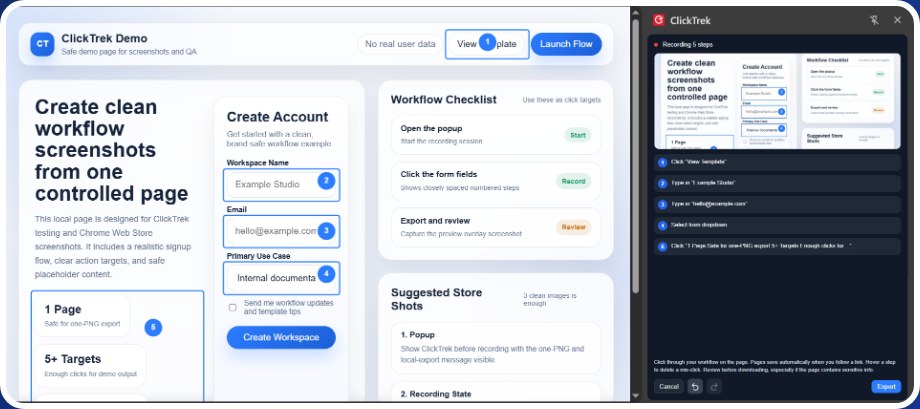
Click the ClickTrek icon in the Chrome toolbar, then Start Recording. Work as usual. Each click becomes a numbered step in the side panel, and recording continues when a link takes you to the next page.
2 · Review
Check every screen before you export
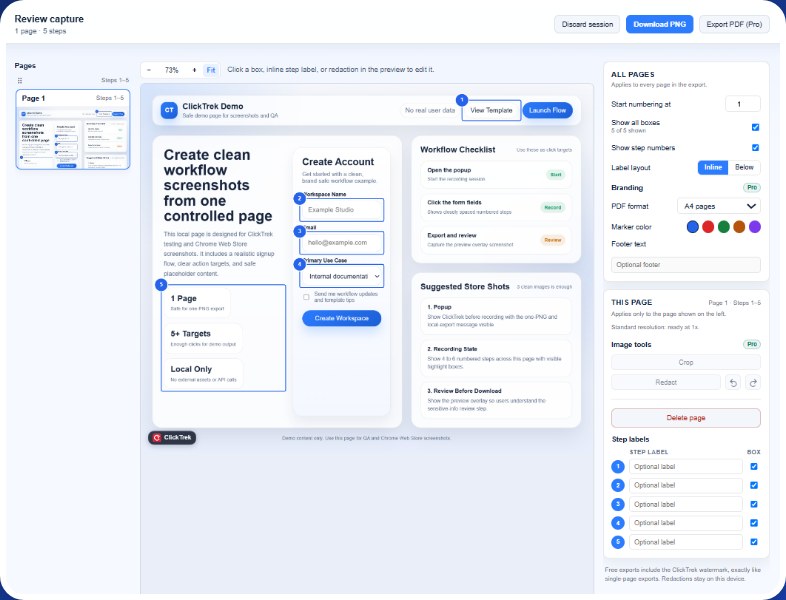
Click Finish. On the Review capture page you preview each page, add optional step labels, show or hide each highlight box, delete pages you don't need, and check for anything sensitive.
3 · Export
One image per screen
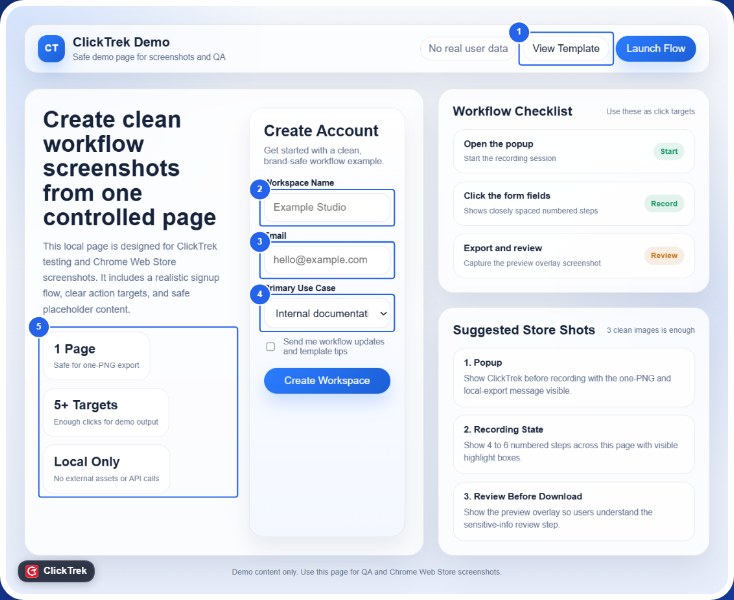
Download one PNG for a single page, or a .zip of numbered PNGs in step order for a multi-page workflow. Files are saved straight to your device, ready for a document, a ticket or a chat.
What people use it for
SOPs and process docs
Record a process once and paste the numbered screenshots into your SOP.
Training and how-to guides
Show new staff, customers or family exactly where to click.
Handing over your work
Document web-based tasks for a colleague or your replacement.
Bug reports
Capture the exact click path that leads to a problem.
Replacing Steps Recorder
Record steps with screenshots for tasks done in a web browser.
Private guides
No account, and your images stay on your device.
Privacy
- No account is needed to record or export.
- ClickTrek captures and edits locally in your browser. It does not upload screenshots, page content, clicks, annotations or exported files.
- A recording session stays in local browser storage so it survives navigation and browser restarts. Discard it when you are done, or ClickTrek removes it after more than 14 days of inactivity.
- Pro activation uses a licensing service, and Stripe handles payment. Neither receives screenshot data. Privacy policy
Free and Pro
| Free | Pro (one-time license) |
|---|---|
| Single- or multi-page recording | Everything in Free |
| Numbered steps, labels and highlight boxes | Exports without the watermark |
| Edit labels and boxes in the preview | HD 2x PNG when the page size allows |
| Remove pages before export | PDF export |
| One PNG, or a .zip of PNGs for several pages | Per-page cropping and redaction |
| Complete, shareable exports with a small ClickTrek watermark | Marker colors, footer text, up to 3 devices |
The Pro price, taxes and payment terms are shown in Stripe Checkout before you pay.
Questions
Do I need an account?
No. Install the extension and start recording.
Are my screenshots uploaded anywhere?
No. Images are captured, edited and exported in your browser and saved to your device.
Does it work across several pages?
Yes. Recording continues when you follow a link, and each screen becomes its own image in step order.
Which pages can it record?
Regular websites in Google Chrome. It cannot record Chrome's own pages (such as settings pages) or the Chrome Web Store, and it does not record desktop apps.
What languages does it support?
English, German, Spanish, French, Japanese and Simplified Chinese.
Is it free?
Yes. Free exports are complete and carry a small ClickTrek watermark. Pro is an optional one-time license.