 ClickTrek
How to create an SOP with screenshots, quickly
Short answer: write a one-paragraph header (purpose, who does it, when), then record the process once with a click-recording tool so every step gets a numbered screenshot, and paste the images under short step descriptions. For a 10 to 15 step web process this takes minutes instead of an afternoon.
A simple SOP template
| Title | What the procedure does, as a task: "Issue a refund in the billing system" |
|---|---|
| Purpose and scope | Why it exists and when to use it |
| Owner and review date | Who keeps it up to date, and when it was last checked |
| Before you start | Access, accounts or information needed |
| Steps | Numbered steps, one action each, each with a screenshot |
| Result | What "done" looks like, and what to do if something goes wrong |
Filling in the steps with ClickTrek
- Open the system where the process starts. Use a test record or sample data if you can.
- Click the ClickTrek icon in Chrome and choose Start Recording.
- Carry out the process once, at a normal pace. Each click is numbered and boxed, and the recording follows you across pages.
- Click Finish, check each page on the Review capture page, add short step labels if you like, and delete anything that shouldn't be in the SOP.
- Download the images and paste them into your SOP in Google Docs, Word, Notion, Confluence or your wiki, one under each step.
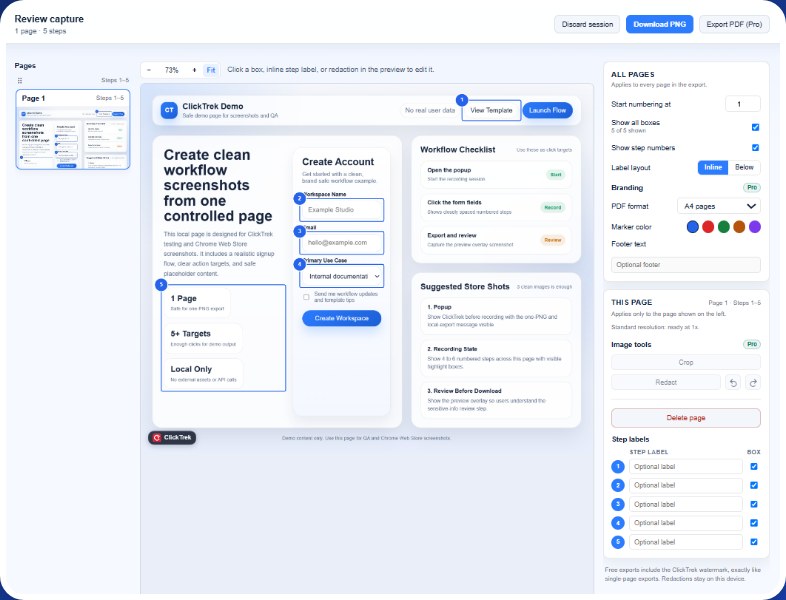
Before export you can add labels, show or hide boxes and remove pages.
Documenting your work before a handover
If you are leaving a role or going on leave, the fastest useful handover is a set of short SOPs for the tasks only you know:
- List the recurring tasks you do in web tools (weekly reports, user set-up, invoicing, publishing).
- Record each task once with ClickTrek while you do it for real, using test data where possible.
- Put each recording in a document with the template above, and add the "why" and the exceptions that the pictures can't show.
- Ask your replacement to follow one guide while you watch, and fix the gaps.
Keep SOPs current
- Add a review date and re-record when a screen changes; re-recording is faster than editing old screenshots.
- Keep one procedure per document so changes stay small.
- Check screenshots for customer data before sharing. ClickTrek Pro can redact parts of a page; on the free version, record with test data.
Record your next SOP in one pass. Free, no account, images saved only to your device.
Add ClickTrek to Chrome